Bitbucket
Woodpecker comes with built-in support for Bitbucket Cloud. To enable Bitbucket Cloud you should configure the Woodpecker container using the following environment variables:
WOODPECKER_BITBUCKET=true
WOODPECKER_BITBUCKET_CLIENT=... # called "Key" in Bitbucket
WOODPECKER_BITBUCKET_SECRET=...
Registration
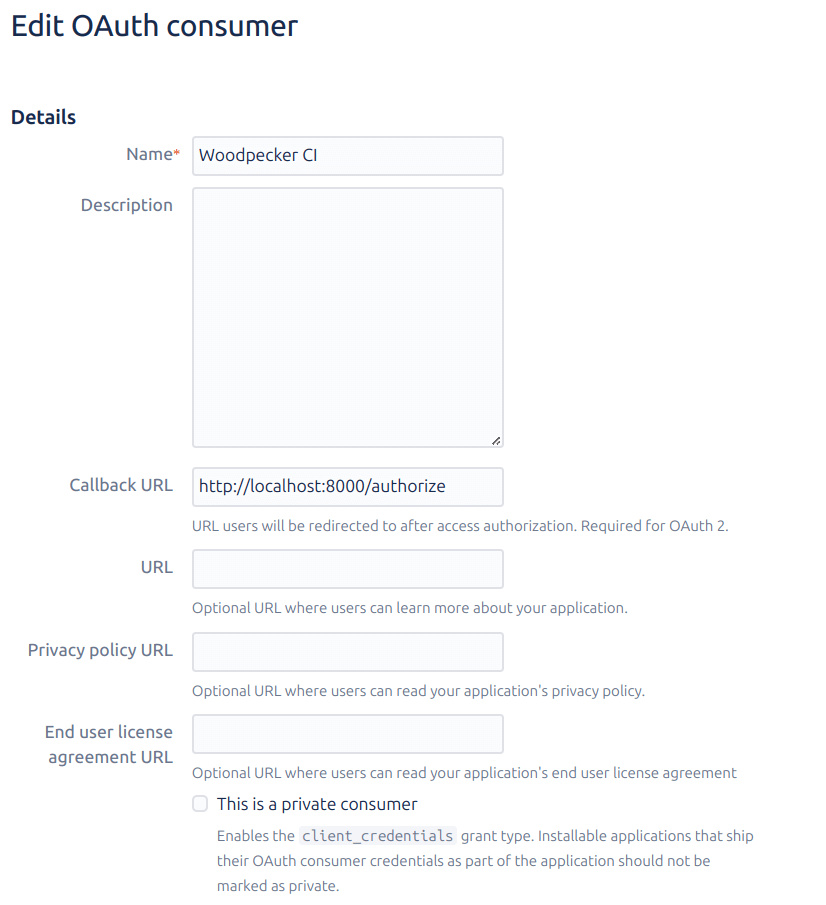
You must register an OAuth application at Bitbucket in order to get a key and secret combination for Woodpecker. Navigate to your workspace settings and choose OAuth consumers from the menu, and finally click Add Consumer (the url should be like: https://bitbucket.org/[your-project-name]/workspace/settings/api).
Please set a name and set the Callback URL like this:
https://<your-woodpecker-address>/authorize
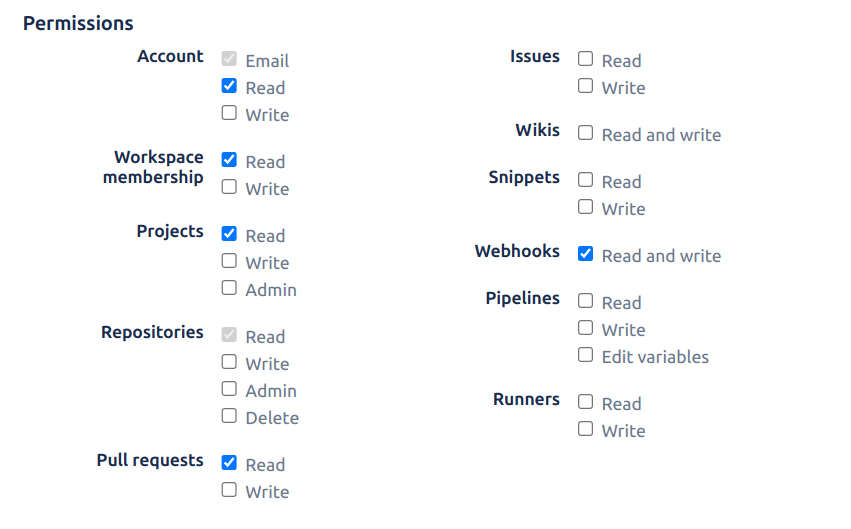
Please also be sure to check the following permissions:
- Account: Email, Read
- Workspace membership: Read
- Projects: Read
- Repositories: Read
- Pull requests: Read
- Webhooks: Read and Write
Configuration
This is a full list of configuration options. Please note that many of these options use default configuration values that should work for the majority of installations.
BITBUCKET
- Name:
WOODPECKER_BITBUCKET - Default:
false
Enables the Bitbucket driver.
BITBUCKET_CLIENT
- Name:
WOODPECKER_BITBUCKET_CLIENT - Default: none
Configures the Bitbucket OAuth client key. This is used to authorize access.
BITBUCKET_CLIENT_FILE
- Name:
WOODPECKER_BITBUCKET_CLIENT_FILE - Default: none
Read the value for WOODPECKER_BITBUCKET_CLIENT from the specified filepath
BITBUCKET_SECRET
- Name:
WOODPECKER_BITBUCKET_SECRET - Default: none
Configures the Bitbucket OAuth client secret. This is used to authorize access.
BITBUCKET_SECRET_FILE
- Name:
WOODPECKER_BITBUCKET_SECRET_FILE - Default: none
Read the value for WOODPECKER_BITBUCKET_SECRET from the specified filepath
Known Issues
Bitbucket build keys are limited to 40 characters: issue #5176. If a job exceeds this limit, you can adjust the key by modifying the WOODPECKER_STATUS_CONTEXT or WOODPECKER_STATUS_CONTEXT_FORMAT variables. See the environment variables documentation for more details.
Missing Features
Path filters for pull requests are not supported. We are interested in patches to include this functionality. If you are interested in contributing to Woodpecker and submitting a patch please contact us via Discord or Matrix.